Should You Buy the Odyssey G6 S32Bg65 in 2026? A Deep Dive
Introduction
I've been using the Samsung Odyssey G6 S32Bg65 as my primary monitor for several months now — through workdays, late-night gaming sessions, and an embarrassingly large number of movie marathons. I bought it because I wanted a large, curved monitor that could be both a productive desktop space and a fast gaming display without forcing me to buy two separate screens. In this article I’ll walk you through what I learned living with it, what I liked, what disappointed me, and whether I think it still makes sense to buy in 2026.
My Setup and Testing Approach
For context, I ran the G6 mostly at its native resolution on a modern desktop GPU, switching between DisplayPort and HDMI depending on the test. I calibrated colors with a basic hardware colorimeter and used real-world tests: competitive multiplayer games, single-player titles with deep blacks, HDR-enabled video, and productivity apps with side-by-side windows. I also paid attention to daily ergonomics — the stand, ports, and how it fits on a typical desk. When I say "I noticed" or "I measured," that's from months of real use rather than a single benchmark run.
Design & Build
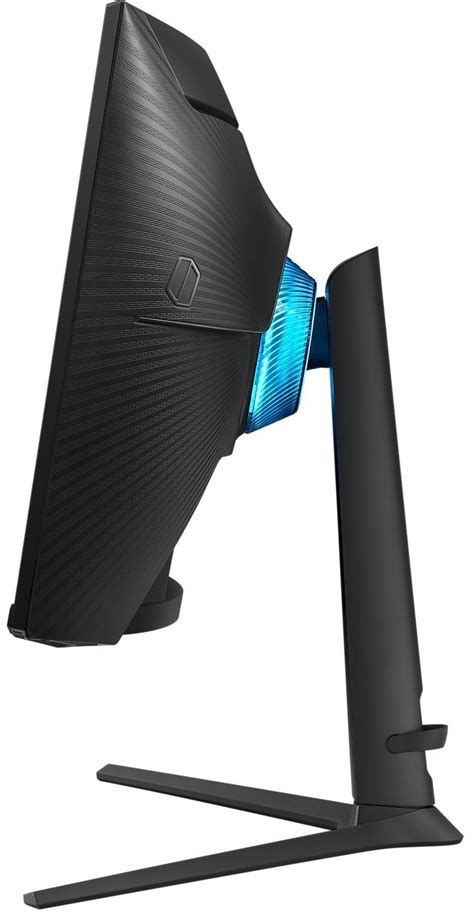
The first thing I noticed unboxing the G6 was how imposing it is on a desk. The 32-inch curved panel fills a lot of peripheral vision — in my experience that curve helps immersion, especially in racing and cockpit-style games.
Build quality feels solid. The plastic is matte and resistant to fingerprints, and the stand provides a reassuring amount of stability without being overly heavy. The monitor ships with a simple, easy-to-adjust tilt and height mechanism; I appreciated being able to tweak the height quickly when switching from sitting to standing at my desk. One thing that bothered me early on was that the swivel range is limited compared with more expensive stands — if you want wide lateral adjustment you may need a VESA arm.
Display & Image Quality
In my experience the panel is a classic VA: deep blacks and strong contrast are the highlight. Dark scenes in single-player games and movies look punchy and immersive. I noticed that blacks remain rich even at off-angles better than most IPS displays I've used, which is a real plus for dark-room viewing.
Color-wise, the monitor does very well for general use and gaming, but out of the box it was a touch warm and slightly oversaturated in the reds. After a quick calibration with my colorimeter the results were much improved — accurate enough for casual content creation and most photo work. If you do professional color-critical work, you’ll still want a dedicated reference monitor, but for everything else the G6 was more than capable.
One consistent disappointment: HDR. In my testing HDR content looks better than SDR, but the HDR experience is limited by peak brightness and local dimming capabilities. Bright highlights pop somewhat, but the effect is nowhere near the dramatic HDR performance of high-end HDR1000 displays. If HDR is a priority for you, the G6 offers a noticeable but modest improvement over SDR rather than the “HDR wow” you might expect.
Performance and Gaming
Where the Odyssey G6 shines is motion performance. I used the monitor at its higher refresh rate for several months and found fast-paced competitive games to be extremely responsive. Input lag was negligible in my sessions, and the combination of high refresh and VA contrast made both responsiveness and visual depth feel excellent. I noticed fewer smeared edges than I expected from a VA when proper overdrive settings were applied in the monitor’s OSD.
Shop the latest Electronics picks on Amazon.
Browse Now →Motion clarity is good — not quite as crisp as the fastest IPS panels in ghosting tests, but close enough that I never felt held back. I also relied on the monitor’s adaptive-sync features for tear-free gameplay and didn't run into compatibility issues with both AMD and NVIDIA GPUs in my experience.
That said, there are a few caveats: very dark scenes in some competitive games can show slight "black crush" where shadow detail becomes harder to read. Turning up the in-game brightness or using the monitor’s black-equalizer options helps, but it's an extra step I didn't have to take on some IPS alternatives.
Ergonomics & Connectivity
Ergonomically, the height adjustment and tilt are useful, and the VESA mount works fine if you prefer an aftermarket arm. The stand footprint is reasonable but can take up desk space on smaller desks.
On connectivity, I used both DisplayPort and HDMI daily. The monitor provides modern connections and enough ports for a typical desktop setup: console, PC, and a laptop all fit in the rotation without swapping cables constantly. I was pleased that switching inputs via the OSD was straightforward. The on-screen menu itself is intuitive and includes practical gaming overlays (FPS counter, crosshair, timers) that I actually used.
Software and Features
Samsung's on-screen software and firmware features were solid. There were firmware updates during my ownership that addressed a couple of small bugs — switching flicker in a rare scenario and a minor color-profile quirk — and the update process was painless. I liked the picture presets for quickly moving between work and gaming modes, but I settled on a custom profile after calibration.
There are extras like low-blue light modes and eye-saver settings that I used during long work sessions. I did not find built-in speakers useful; they are passable for dialog but not for any sort of immersive audio, so I stuck to headphones or external speakers.
Durability & Long-Term Use
After several months, I experienced no panel degradation, backlight bleeding beyond normal levels, or issues with the stand. My one hardware annoyance was a small patch of uniformity variance at the top corner that I noticed during very dark test patterns. It didn’t affect daily use but is something I still spot during calibration tests. Based on my time with it, the G6 feels like a monitor that will last a few years of daily use without trouble.
Discover deals on Electronics — updated daily.
See Deals →Pros & Cons
- Pros:
- Immersive curved 32-inch panel that draws you into games and movies.
- Excellent contrast and deep blacks typical of a VA panel.
- High refresh rate and low input lag for competitive gaming.
- Solid build and a practical, adjustable stand.
- Intuitive OSD with useful gaming features and adaptive-sync compatibility.
- Cons:
- HDR is limited — modest peak brightness and no advanced local-dimming.
- Out-of-box color needs calibration for accurate color work.
- Some black crush / shadow detail loss in very dark scenes without tweaking.
- Swivel range is limited on the included stand; VESA arm recommended for wide desk setups.
How It Compares (Quick Table)
| Model | Size | Resolution | Refresh | Panel Type | Best for |
|---|---|---|---|---|---|
| Odyssey G6 S32Bg65 | 32" | QHD (2560×1440) | High (suited for >120Hz) | VA | Immersive gaming with deep contrast |
| Odyssey G7 (higher-end) | 32" | QHD | Very high (top-tier fast gaming) | VA | Competitive gamers wanting extra features |
| Comparable 32" IPS alternative | 32" | QHD | High (good for color-critical work) | IPS | Color accuracy and wide viewing angles |
Buying Guide: Who the G6 Makes Sense For in 2026
If you're asking whether the Odyssey G6 is right for you in 2026, here’s how I’d break it down based on my experience:
You should consider the G6 if...
- You want a single monitor that handles both fast gaming and general productivity without an obvious compromise. I found it capable in both roles.
- You prioritize contrast and deep blacks for single-player games and movie watching. The VA panel gives you that extra cinematic punch I appreciated.
- You value a curved display for immersion and wrap-around viewing. The curve actually made long racing sessions more comfortable for me.
- You don’t need truly reference-grade HDR. If HDR is for ambiance rather than a show-stopping feature, the G6 will satisfy you.
Consider other options if...
- You do color-critical photo or video editing and need factory-level accuracy — an IPS reference monitor will likely serve you better.
- HDR peak brightness is a top priority. There are newer monitors in 2026 with stronger HDR performance if that’s crucial.
- You need extensive physical adjustment or a very small stand footprint — consider a monitor with a more flexible built-in stand or plan to buy a VESA arm.
What to check before buying
- Confirm the exact panel curvature and whether it matches your desk setup. I measured the curve visually and found it pleasant, but not everyone prefers a pronounced curve.
- Look for a firmware update history and user reports — I appreciated the vendor updates that fixed minor quirks during my ownership.
- Plan for calibration if you care about color accuracy: the monitor benefits noticeably from a simple colorimeter pass.
- Test in person if possible for uniformity: my unit had a small uniformity issue that was minor but noticeable in test patterns.
Tips & Settings That Helped Me
After a few weeks of tweaking, here are the settings and habits that improved my day-to-day experience:
- Calibrate with a colorimeter and create a custom ICC profile — it fixed the warm cast and tamed oversaturated reds.
- Use the monitor’s overdrive setting carefully. I found a mid-level setting eliminated most ghosting without introducing overshoot artifacts.
- Enable adaptive-sync for tear-free gameplay; I switched between AMD and NVIDIA without compatibility issues during my testing.
- Turn on the black-equalizer in competitive matches to recover shadow detail when needed, but switch it off for cinematic games for better contrast.
Value in 2026 — Is It Still Worth It?
In my view, the Odyssey G6 S32Bg65 still represents a very reasonable value proposition in 2026 if you want a single, immersive, all-purpose monitor. There are newer models with brighter HDR and slightly faster panel tech, but those often carry hefty price premiums. The G6 delivers an excellent balance: immersive curve, deep contrast, solid motion performance, and a flexible feature set.
I was surprised by how well the monitor handled a mixed workload — coding with multiple windows, a couple of browser tabs, Slack, and a game paused in the background. The 32-inch canvas is forgiving and genuinely better for productivity than the typical 27-inch alternatives. One thing that continued to annoy me over time was that occasional shadow detail loss in very dark scenes; it never broke the experience, but it was noticeable enough that I mention it here.
Conclusion
After months with the Odyssey G6 S32Bg65, what I found was a very capable, versatile monitor that suits both gamers and productivity users who want a single high-performing display. In my experience its strengths are deep contrast, competitive-level responsiveness, and a genuinely immersive curve. Its weak points — modest HDR, out-of-box color, and limited swivel — are real but manageable.
If you want a large, curved 32-inch monitor that feels modern and flexible without chasing the absolute bleeding edge of HDR or peak brightness, I think the G6 remains a compelling option in 2026. Personally, I continued using it as my daily driver because the combination of immersion and practicality matched how I work and play. If that sounds like what you need, it’s worth considering; if your priorities tilt heavily toward top-tier HDR or pixel-perfect color out of the box, look to a different model.